Become A DAO Member
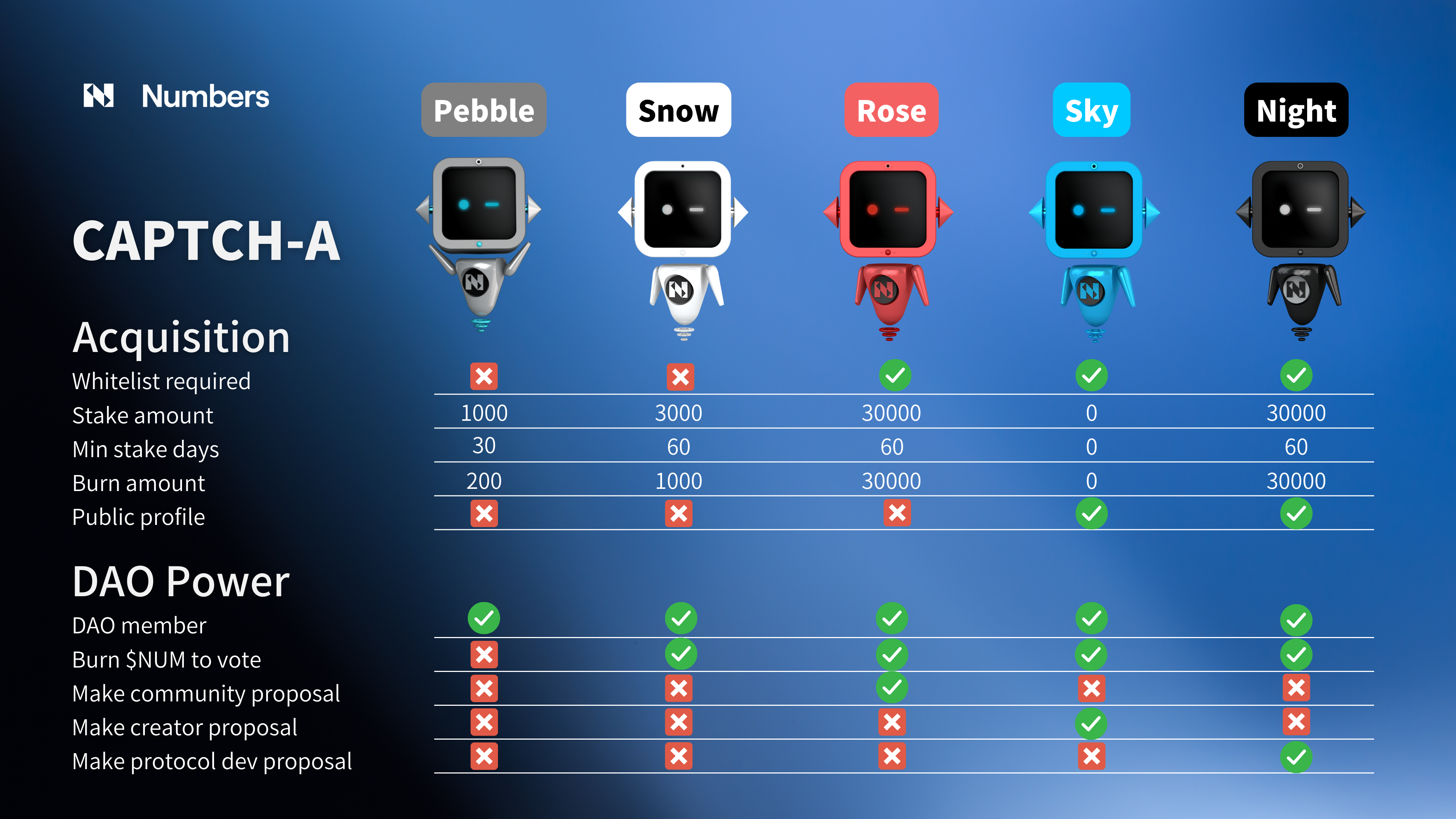
To participate in NumbersDAO, you must be a CAPTCH-A NFT holder. CAPTCH-A is the official membership NFT of NumbersDAO. There are 5 roles of CAPTCH-A, Pebble, Snow, Rose, Sky and Night. More details of the responsibilities and capabilities can be found in the session of Roles & Responsibilities.
Snow, Rose, Sky, and Night are SoulBound NFTs. This means they are permanently bound to a specific wallet for the duration of the CAPTCH-A’s existence. To learn more about the idea of SoulBound NFT check out the following article.
For a full CAPTCH-A breakdown, see the image below for more details:
How to get your own CAPTCH-A
Pebble and Snow were previously claimed by staking or burning a certain amount of NUM on an online claim site. That claim site has been retired and is no longer available.
Rose is exclusive for active community contributor of Numbers Protocol, if you're interested in becoming one, check out our ambassador program!
Sky and Night are invitation-only. Sky invites should either have a reputation in the creator community or be professional creators themselves and be proposed by at least one existing Sky member. Night invites should demonstrate a strong understanding of Numbers Protocol, tokenomics, and Web3 projects. In both scenarios, invites must disclose their profiles to be considered. The purpose of Sky and Night CAPTCH-A’s is to acquire DAO members with professions that align with the visions of the Numbers Protocol.
SOULBOUND NFT
Snow, Rose, Sky, and Night are SoulBound NFTs. This means they are permanently bound to a specific wallet for the duration of the CAPTCH-A’s existence. To learn more about SoulBound NFT, check out the following article.
Viewing your CAPTCH-A in Metamask
.png)
With support for Numbers Mainnet now available on MetaMask, you can view your CAPTCH-A directly in your MetaMask wallet!
To do so, you'll need to import the NFT manually. Here's how:
- Ensure you are on the Numbers Network in MetaMask.
- Navigate to the NFT tab in MetaMask, scroll down, and select 'Import NFT'.
- In the 'Address' field, enter:
0x0c8c81d6954db5bf8c49d58cb81340e023d6f530. - In the 'Token ID' field, input the ID from your transaction.
![Successful NFT token-transfer record in the explorer with TokenID [16373] circled in red to show where to find the ID for importing the NFT into MetaMask](/assets/image (6).png)